
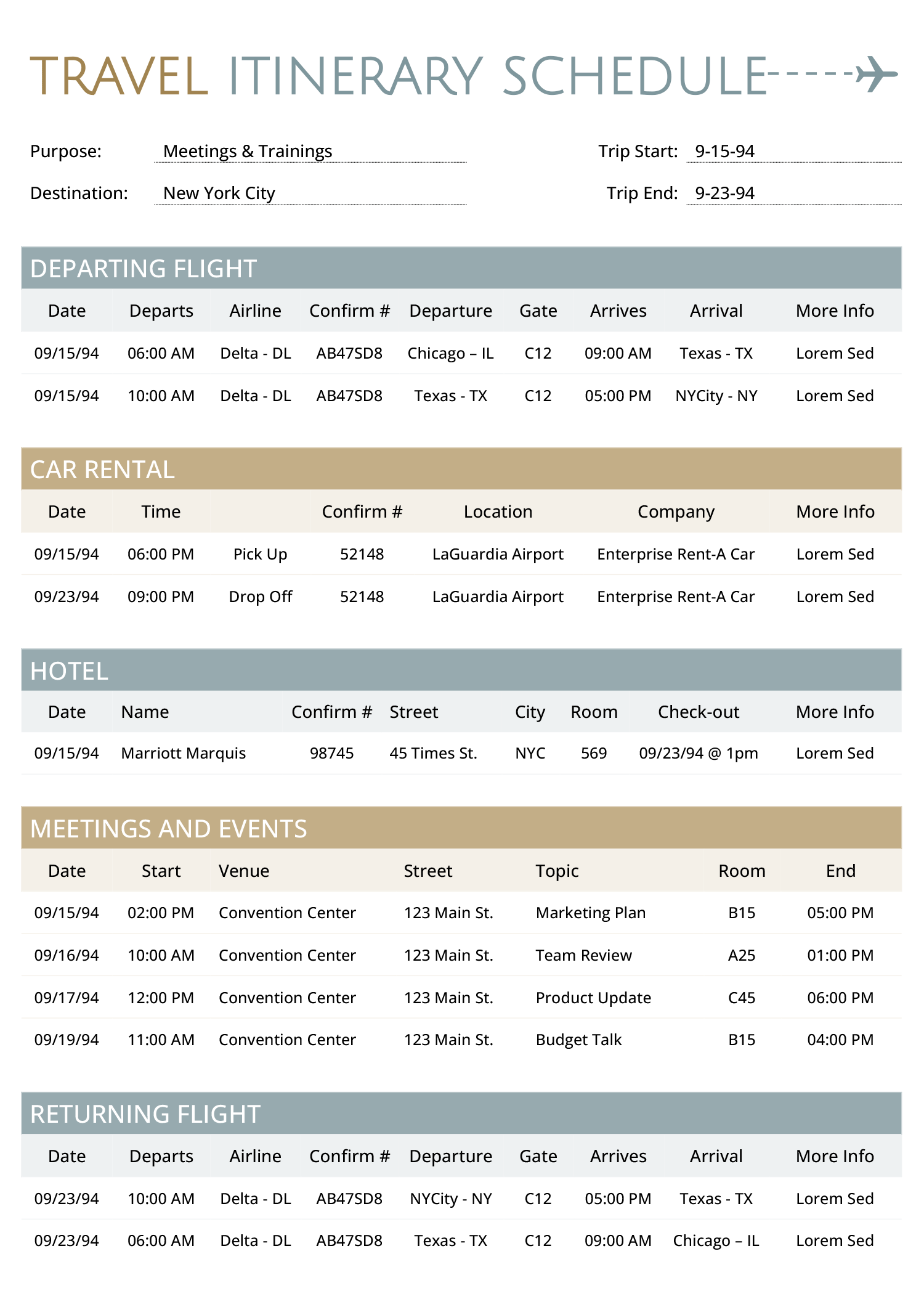




This template is designed to organize travel plans involving multiple destinations, bookings, and scheduled activities. It can be used by individuals, families, or assistants planning personal vacations, corporate trips, or executive travel. Executive assistants can use it to manage business itineraries that include flights, hotel stays, rental cars, and time-blocked meetings or events. The itinerary is divided into labeled sections—departure, ground transport, accommodation, daily schedule, and return—so each part of the trip appears in the order it will happen.
How to Use This Itinerary Template
This itinerary template is divided into different sections from departure to return. Information is entered row by row, using fixed columns for timing, locations, references, and notes. Here’s a breakdown of each section:
Departure Flight
List the departure time, airline name, flight number, origin and destination airports, and terminal or gate if available. If the trip includes layovers, enter each leg in a separate row to avoid confusion. Use the notes column to add boarding times, check-in reminders, seat assignments, or meal preferences. When planning international travel, indicate the time zone to prevent scheduling conflicts.
Car Rental
Record both pickup and return times, rental agency name, confirmation number, and pickup location (such as airport terminal, hotel, or downtown branch). If the return location differs from the pickup point, mention it clearly. Optional details may include the vehicle class, license plate (if preassigned), or insurance coverage. Notes can be used to flag any special conditions such as pre-paid fuel, toll passes, or drop-off instructions.
Car Rental
Enter the pickup and drop-off times, rental agency or car service name, confirmation number, and pickup location (such as an airport terminal, hotel, or office). This section works for both self-drive rentals and chauffeur-driven services. For self-drive bookings, include the vehicle type, return location (if different), and notes on insurance or fuel terms. For car services with a driver, use the notes column to add the driver’s name, contact number, vehicle details, airport signage, or wait time instructions.
Hotel
Enter the check-in and check-out dates, hotel name, complete address, and booking confirmation number. If multiple hotels are booked for the trip, use separate rows for each. Use the notes field to indicate the reservation name (if booked by someone else), room type, parking arrangements, or early check-in requests. For trips involving groups, mention the number of rooms or guest names if needed.
For meetings in different locations on the same day, use the notes column to add estimated travel time based on local traffic. This buffer helps prevent unexpected overlaps and reduces last-minute delays.
Meeting / Daily Schedule
Schedule all time-blocked events such as business meetings, conference sessions, tours, or site visits. Include the event time, venue name, full address, event topic or purpose, and estimated duration. Additional details—like contact person, room number, entry pass requirement, or virtual link—can be added in the notes. If events span different time zones, make sure to label each.
Return Flight
List return flight details in the same format as the departure: time, airline, flight number, airports, and gate. Use the notes column to document arrival logistics such as baggage claim location, pickup service, or connecting travel plans. If the return flight involves overnight travel or airport changes, note them here.
Additional Considerations
- If the itinerary is being shared with others—such as a team, client, or family group—make sure all confirmation numbers and contact details are accurate and up to date before finalizing the file.
- For trips spanning multiple time zones, label the time zone next to each entry or standardize the entire itinerary in one zone to avoid confusion.
- If travelers have different arrival or departure times but follow a shared schedule in between, duplicate the file for each traveler and adjust the travel sections accordingly.
- Extra rows can be added to any section if the trip includes more than one flight, hotel, or meeting per day.
- To avoid misalignment when printing, preview the template after editing to ensure all information fits within page margins and no rows are split across pages.
FAQs
Yes. You can add more rows under each section to include additional flights, hotels, or meetings. For complex trips involving multiple cities, consider duplicating the template page for each travel segment or creating separate files for each leg of the journey.
Yes. You can document international flights, hotel stays, and meeting schedules as usual. For added clarity, use the notes column to record visa status, passport number (if needed), and local emergency contact details. Clearly label time zones to avoid confusion during cross-border transitions.
If the overall schedule is shared but individual bookings vary, duplicate the file for each traveler and edit only the parts that differ—such as flight times, hotel names, or pickup locations. For minor differences, you can also tag each row with initials or traveler names in the notes column.
About This Template
This itinerary template is available in Word, Excel, Google Docs and Google Sheets. You can update travel details, add or remove rows, and adjust the content based on your trip. It’s recommended to export the file as a PDF after customization to prevent any accidental edits and preserve the layout when sharing or storing for reference.






