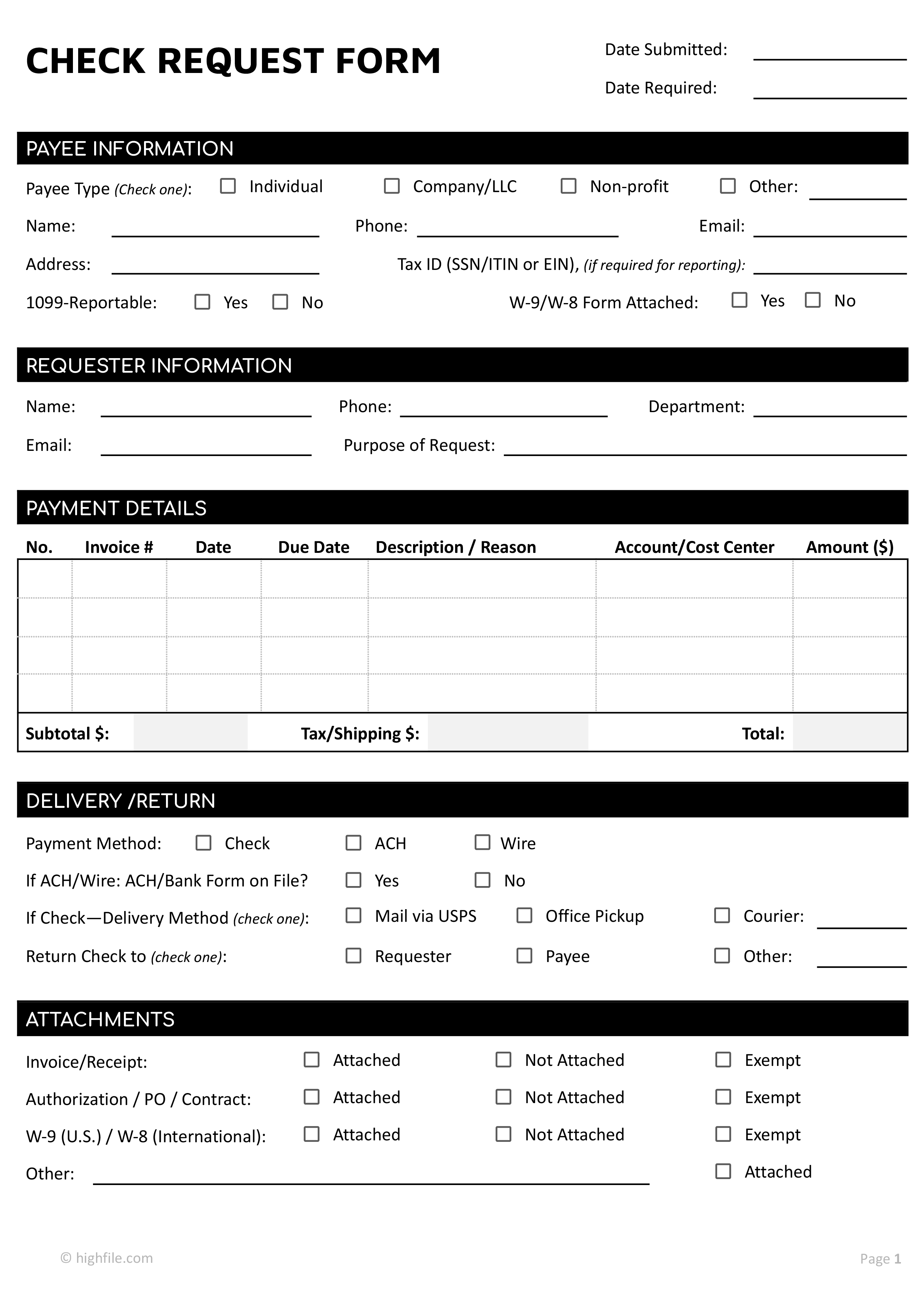



A check request form is used when you need your organization to issue payment for an approved business expense, such as a vendor invoice, service fee, refund, or reimbursement. It documents why payment is needed, who should be paid, how the expense should be coded, and which internal approvals authorize the disbursement.
This check request form template is intended for departments, project leads, administrators, and staff members who submit payment requests to finance. It captures payee details, requester contact information, invoice or expense references, delivery preferences, supporting documents, and signoffs that confirm the request is ready for processing.
How to Use This Check Request Form
Start by filling in the date submitted and the date required so finance can prioritize processing. Then complete each section in order, attaching any documentation your organization requires before payment can be released.
Payee Information
Select the payee type to indicate who will receive funds. Enter the payee’s legal name, phone, email, and address so the payment can be issued correctly. If your organization needs tax reporting for this payment, enter the payee’s Tax ID and mark whether the payment is 1099 reportable.
Use the W-9/W-8 form attached checkbox to confirm that the appropriate tax form is included when required by your internal process.
Requester Information
Enter your name, phone number, email address, and department so finance knows who to contact if questions come up. Use the purpose of request line to describe what the payment covers, such as an invoice payment, reimbursement, service charge, or another approved expense.
Payment Details
List each item being paid in the table. Use invoice number, date, due date, and description or reason to match each line to its supporting document. Enter the account or cost center to show where the expense should be coded, then enter the amount for each line.
Add the subtotal, then enter any tax or shipping charges if they apply, and calculate the total amount requested.
If your requested amount differs from the invoice due to a discount, partial payment, credit, or adjustment, note the reason in the description or reason field so finance can review it without delays.
Delivery and Return
Select the payment method as check, ACH, or wire. If you choose ACH or wire, confirm whether the ACH or bank form is on file. If you choose check, select the delivery method, then indicate whether the check should be returned to the requester, the payee, or another recipient.
Attachments
Mark each supporting item as attached, not attached, or exempt based on what your organization requires for this type of payment. Use the other line to name any additional document and mark whether it is attached.
Certification
Review the certification statement, then sign and date the form to confirm the request relates to official business, the required documentation is included, and the expense is not being submitted as a duplicate.
Authorization and Approval
Have the department head sign and date to approve the request at the department level. Then have the finance approver sign and date to confirm the request is acceptable for processing under the organization’s review process.
Finance Use Only
This section is completed by finance staff to document internal processing. It records account coding verification, check payment number, payment date, who entered the transaction, and any internal notes or stamps.
This check request form template can be edited in Microsoft Word or Google Docs to match the internal accounts payable workflow. Update field labels, add or remove checkboxes, and adjust the approval lines to reflect who must sign off before finance can process a payment. If your process does not use 1099 tracking or W-8 forms, remove those fields or rename them to match your vendor onboarding requirements.
You can also tailor the payment table for your day-to-day use by adding more line items, expanding the description space, or adding internal routing fields such as request number, project code, or manager name. Once the form is complete and signed, save it as a PDF for submission so the formatting stays consistent, then keep a copy with the invoice and supporting documents for recordkeeping.
FAQs
If the amount changes, follow your internal process for revisions. In many organizations, that means submitting a corrected form or adding written approval for the change so the payment file stays consistent for audit and review.
Yes, if they relate to the same payee and follow the same coding and approval path. If invoices involve different payees or different approval requirements, separate requests are usually needed for accurate tracking.
Finance may pause processing until the missing items are attached or the request is corrected. Marking attachments accurately can reduce back and forth and prevent avoidable holds.
You can typically withdraw a request if payment has not been issued. If payment has already been released, the next steps depend on your internal cancellation or reversal process.
Courier delivery is usually chosen when timing is tight or delivery needs to be tracked more closely than standard mail. If courier fees apply, note them in the payment details so the total request reflects the full cost.