
Project Budget Templates
A project budget is only useful if it keeps up with the work, and that is the hard part once tasks, vendors, and phases start to overlap. These project budget templates set planned costs against what you actually spend, with the totals and the difference worked out for you, so you always know where a project stands against its budget rather than finding out at the end. Pick the one that fits how your costs break down and start entering figures.
 ×
× ×
× ×
× ×
×


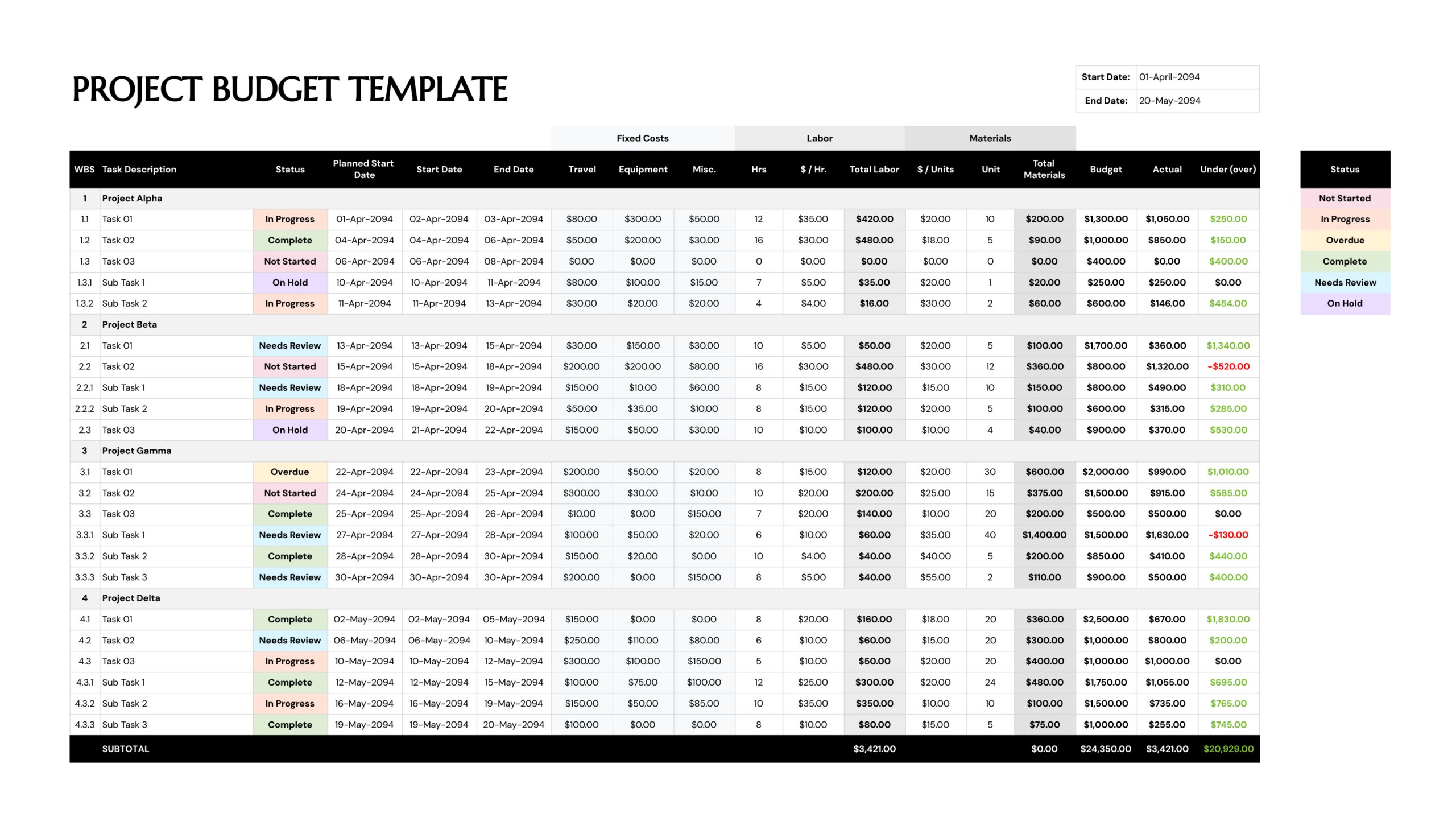
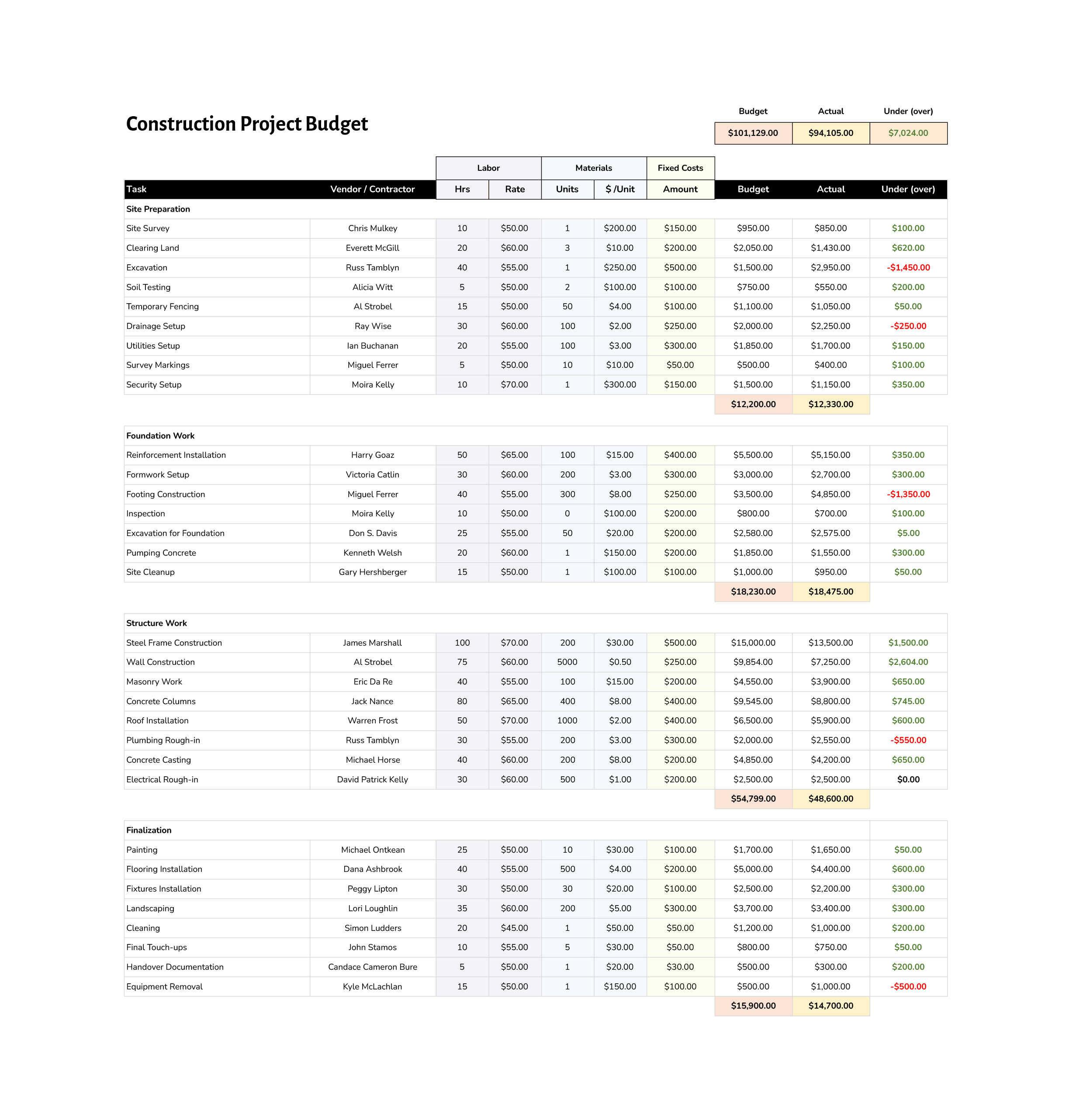



A project budget plans what a piece of work should cost and then tracks what it actually costs as the work happens. The gap between those two, the variance, is the number that matters, because it shows, partway through a project, where costs are heading, over budget or within it, in time to do something about it. These templates are built around that comparison, with planned and actual costs side by side and the difference calculated for you.
Because they are spreadsheets with the formulas already in place, you enter estimates at the start and actual figures as costs come in, and the line totals, phase subtotals, and overall variance update on their own. Costs are grouped the way projects really break down, by phase and by task, often with the labor, materials, and fixed costs that make up each line, so the budget reflects the structure of the work rather than one flat list. You replace the example figures with your own, and the calculation keeps the picture current.
Note: The variance column is the reason to keep a project budget at all, so it is worth checking as you enter actual costs rather than only at the end. A line drifting over early is a signal you can still act on, which is the whole point of tracking planned against actual.
What's on a project budget template
The parts these budgets are built from, whatever the project.
Spending split into the lines a project incurs, often labor, materials, and fixed costs, so each cost goes somewhere meaningful rather than into one total.
Costs grouped by the phase of work they belong to, so spending reads stage by stage and each phase shows its own subtotal.
The estimate for each line, entered at the start, which becomes the baseline everything is later measured against.
What each line really cost, entered as figures come in, sitting beside the estimate for a direct comparison.
The difference between planned and actual, calculated automatically and often flagged when a line goes over, so overruns stand out.
A line for the contractor, vendor, or task behind each cost, so a budget doubles as a record of who and what the money went to.
Numbered structure that breaks the project into tasks and sub-tasks, so costs map onto the same breakdown the work is planned in.
The project-level figures pulled together, total planned against total actual and what remains, for the at-a-glance state of the budget.
A marker against each task showing where it stands, so the budget shows not just the cost but how far the work behind it has got.
A project budget is only as honest as the estimate it starts from. Entering considered planned figures at the outset is what gives the variance something real to measure against later, so the time spent estimating up front is what makes the tracking worth anything once costs start landing.
Filling in a project budget
Setting up the breakdown, entering estimates, and tracking actuals against them.
Set up the phases and tasks to match how your project is actually structured, since the budget tracks costs against that breakdown. The closer it maps to your real plan, the more useful the totals are.
Put in your estimate for each line, the labor, materials, and fixed costs you expect. These become the baseline the rest of the project is measured against.
Tip — Estimate at the line level rather than guessing a phase total, the subtotals build up on their own and are easier to defend.
Adjust the cost categories and labels to fit your project, a construction job and a product launch need very different line items. The template is a starting point to shape to your work.
As costs land, enter the actual figure beside each estimate. The variance and the totals recalculate as you go, so the budget stays current without extra work.
Check the difference between planned and actual as you enter figures, not only at the end. A line going over early is something you can still act on with the project under way.
When a phase needs another line, insert it inside the existing range so the subtotal and variance formulas include it. Adding below a total leaves the new cost uncounted.
Tip — After inserting, check that the phase subtotal still covers the full set of lines, including the new one.
Use the summary totals to see where the project stands and to update whoever needs the cost picture. Each template lists the formats shown on its card.
FAQs
Are the project budget templates automated?
Yes. The spreadsheet templates already contain the formulas for line totals, phase subtotals, and variance. When you enter or change a figure, the budget recalculates on its own, so you supply the numbers and the totals follow.
Can I track planned and actual costs in the same template?
Yes, and that comparison is the point of them. Planned and actual sit in side-by-side columns with a variance column showing the difference, so you enter estimates at the start and update actuals as costs come in, watching the gap as the project runs.
How are these budgets organized?
By phase and by task, the way projects actually break down, rather than as one flat list. Costs sit under the phase they belong to, each phase shows a subtotal, and many templates use a numbered work breakdown so the budget lines up with how the work is planned.
Can I change the phases and cost categories?
Yes. The phases, task rows, and cost categories are all editable, so a construction budget and a product launch budget can each use their own line items. The structure is meant to be reshaped to fit the project in front of you.
What formats do these come in?
Most are spreadsheets in Excel and Google Sheets, since those handle the formulas and calculations. Some planning and structure layouts also come as slide formats for presenting a budget breakdown. Each template’s card shows its formats.