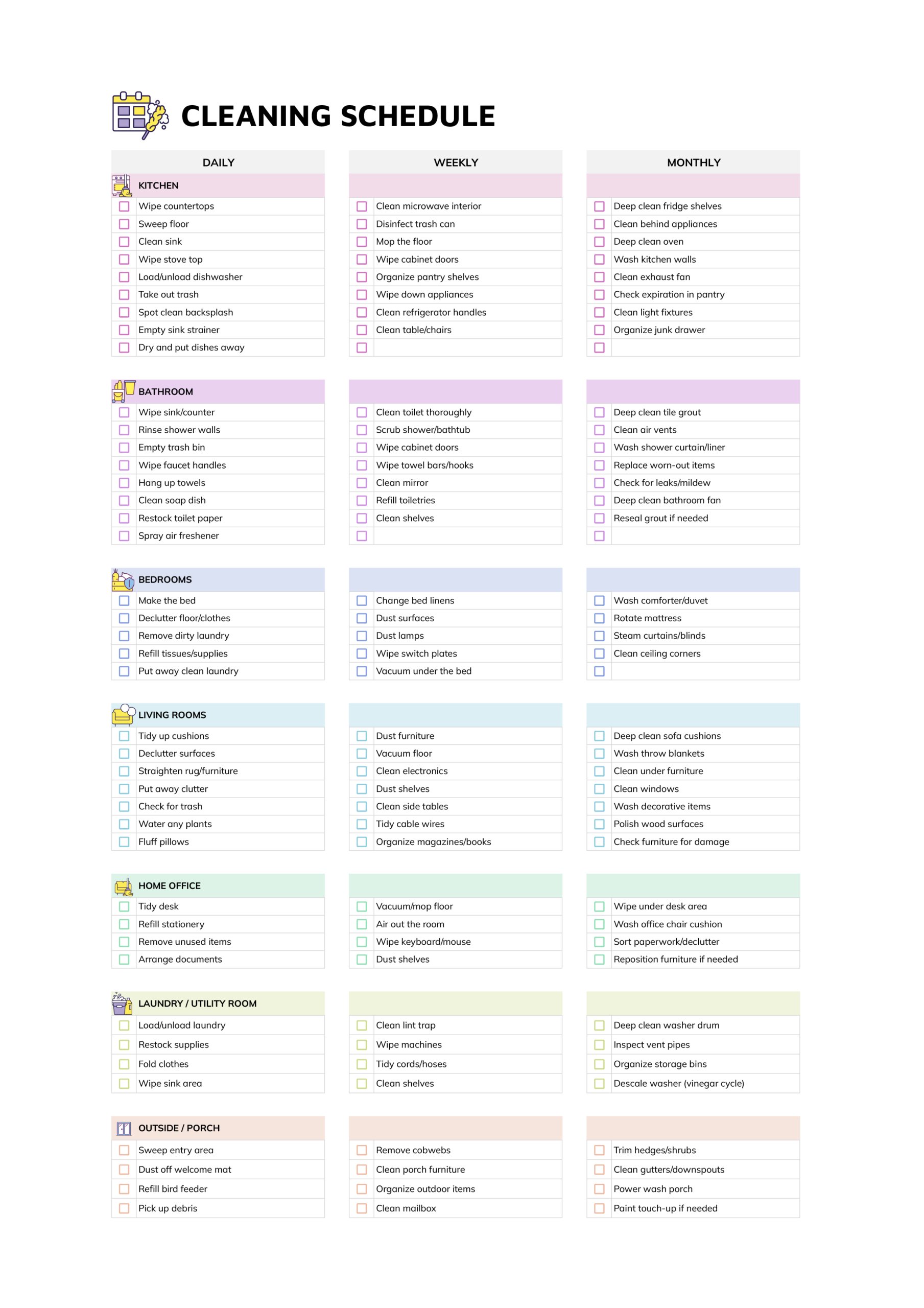



The cafe cleaning schedule template is designed for café owners, managers, and shift leads who want cleaning work to be planned and traceable instead of handled informally. You can map out what must be cleaned each day, week, and month, record who is responsible for each task, and see at a glance which items were completed on every shift.
This template is useful when you are training new staff, keeping hygiene routines steady across different teams, or answering questions from an owner, landlord, or inspector about how cleaning is managed in your café. One file can cover a single site with weekly sheets, or you can keep separate copies for different branches while still following the same approach in each location.
How to Use This Cafe Cleaning Schedule Template
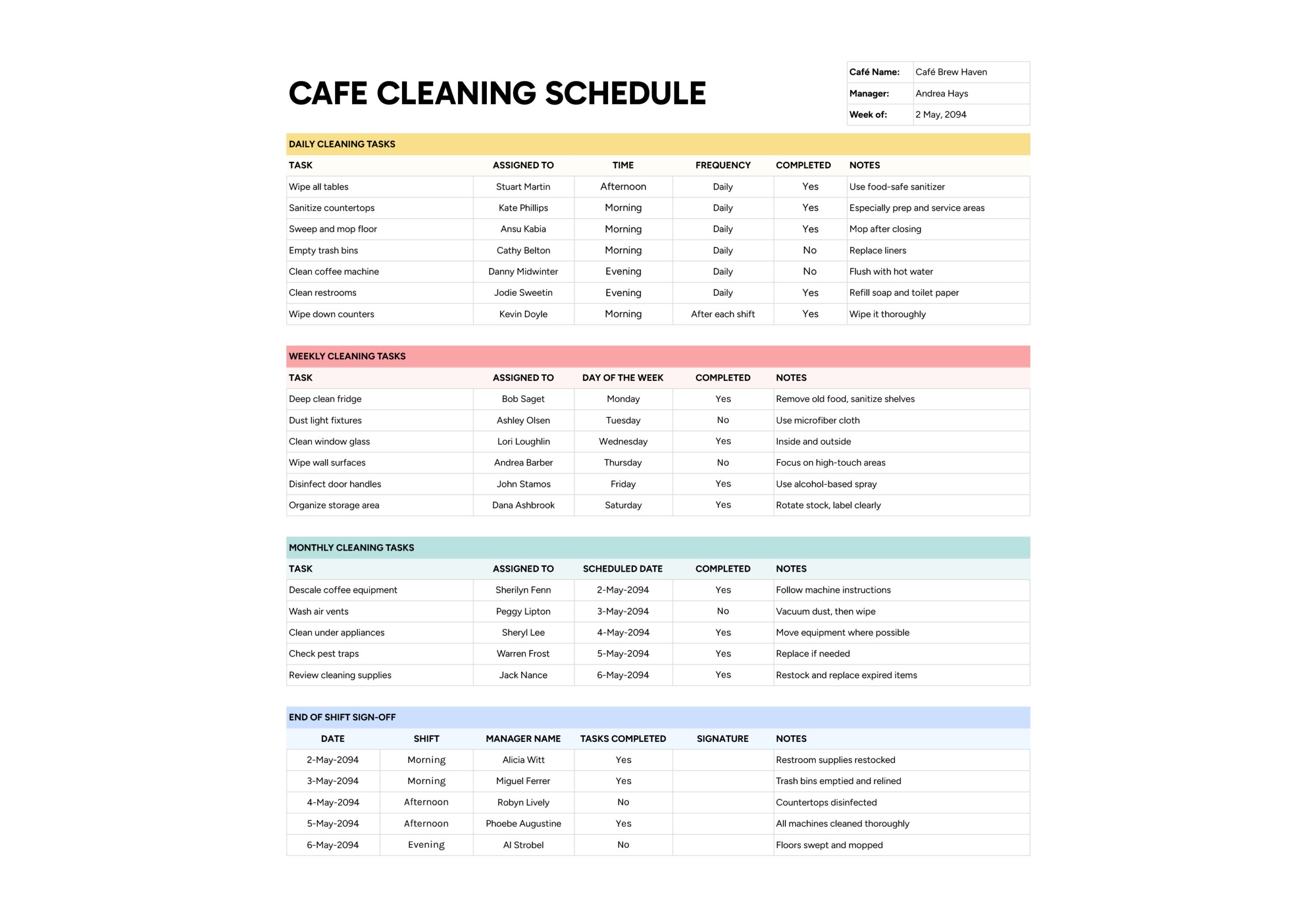
The sheet groups cleaning work into four main areas so you can see regular tasks, deeper tasks, and shift checks in one place.
Add Café Details for the Week
Start with the small table at the top right. Enter your café name in “Cafe Name”, the supervisor or manager in “Manager”, and the week you are planning in “Week of”. Using one sheet for each week keeps records in order and makes it easier to look back at a specific period later. If you manage more than one location, keep a separate file or workbook for each café so information stays specific to that site.
Decide in advance who is responsible for keeping these weekly sheets up to date. Naming one person, such as the shift lead or assistant manager, reduces the risk of gaps where several people assume someone else has updated the schedule.
Plan Daily Cleaning Tasks
The Daily Cleaning Tasks section is where you list jobs that must be done every day. Typical entries include wiping and sanitising tables, cleaning counters, sweeping and mopping floors, emptying bins, cleaning the coffee machine, and checking or restocking restrooms. In “Task”, describe each job clearly so someone reading it for the first time would still know what to do.
Use “Assigned To” to write the name or role responsible for that task during the week. Fill in “Time” with when the work should happen, such as morning opening, midday lull, or after closing. In “Frequency”, note how often it should happen inside the day, for example daily, between rush periods, or after every shift. Once a task is finished, staff or a supervisor update “Completed” with yes or no. The “Notes” column is useful for short reminders about products to use, areas that often get missed, or safety points such as unplug before cleaning.
If you find yourself ticking yes when only part of a task was done, split it into separate lines. For example, instead of one line that says clean restrooms, you might create entries for toilets, sinks, and floors. This makes the checklist more honest and shows very quickly which part is not being covered.
Set Up Weekly Cleaning Tasks
The Weekly Cleaning Tasks section covers deeper cleaning that only needs attention once each week. This can include emptying and sanitising fridges, dusting light fittings, washing windows, wiping walls, disinfecting door handles, or tidying the stock room. In “Task”, write the name of the job, then record the person or role in “Assigned To”.
Use “Day of the Week” to choose when you want the task completed. Spreading these jobs across quieter days prevents everything landing on your busiest trading day. After the task is done, update “Completed” and record anything worth remembering in “Notes”, such as stock rotated by date or damaged shelving noticed during cleaning. Over time, this section becomes a quick check that weekly tasks are not quietly slipping for several weeks in a row.
Schedule Monthly Cleaning Tasks
The Monthly Cleaning Tasks section is for occasional jobs that still matter for hygiene and equipment care. Typical examples include descaling coffee machines, washing air vents, cleaning behind or under heavy appliances, checking pest control equipment, and reviewing cleaning supplies for expiry dates.
In “Task”, describe the job. In “Assigned To”, record the responsible person, which might be a technician for equipment or a senior staff member. Use “Scheduled Date” to pick when in the month the job should be completed. When it is done, set “Completed” to yes and add any important comments in “Notes”, such as parts replaced, problems found, or follow up needed. If you are ever asked how often major cleaning or maintenance tasks are completed, this section gives a clear, date-based record.
Use End of Shift Sign Off
The End of Shift Sign Off area records what happened at the end of each shift. It is especially important when several teams share the same café because it shows how well each team leaves the space for the next one.
For every shift, enter the date in “Date”, then write the shift period in “Shift”, for example morning, afternoon, or evening. In “Manager Name”, record who checked the café at the end of that shift. After reviewing the cleaning lists and walking through the front and back areas, that person notes whether tasks were completed in “Tasks Completed”, signs or initials in “Signature”, and adds short comments in “Notes” such as bins left half full, floors still wet near counter, or restrooms checked and stocked.
Ask supervisors to keep this sheet with them during the last ten to fifteen minutes of each shift and walk the café against the tasks, not from memory. When sign off is linked to an actual walk through, repeated issues show up quickly and you can address them with the right person or adjust routines rather than guessing where things go wrong.
FAQs
You can use patterns from the schedule as one of several inputs when talking about performance. For example, if certain names in “Assigned To” often appear in shifts where “Tasks Completed” is set to no or where notes mention repeated gaps, that is a signal to have a focused discussion about expectations, training, or workload. On the other hand, consistent, thorough completion over many weeks can support recognition and positive feedback.
Yes. Before an inspection, you can quickly review recent weeks to confirm that daily, weekly, and monthly tasks have been recorded as complete and to identify any recurring comments in “Notes” that still need a fix, such as damaged tiles or faulty seals. During an inspection, having several weeks of filled schedules ready to show often demonstrates that cleaning and checks are part of your routine rather than a one time effort.
When a supervisor sets “Tasks Completed” to no in the end of shift section, encourage them to add a short note in “Notes” naming the unfinished tasks. At the start of the next shift, the incoming lead can read those notes and move the missed items back into the Daily or Weekly sections for that day, possibly with a temporary higher priority. If the same type of task keeps being pushed forward, it becomes obvious on the sheets, and you can talk about the cause, whether that is understaffing at certain times, lack of training, or poor placement of cleaning supplies.
When the team changes often, it is easier to assign tasks to roles rather than names. In “Assigned To”, write roles such as “open shift barista,” “close shift barista,” or “kitchen assistant.” Keep a separate rota on the wall or in another sheet that lists who holds each role on each day. During a shift, staff check the schedule under their role instead of searching for their name. This approach keeps the cleaning routine stable even when individual staff members change from week to week.