
Construction Schedule Templates
On a build, one trade cannot start until another finishes, so a slip in the groundwork quietly pushes the framing, the roofing, and everything after it. Construction schedule templates keep that sequence honest, setting each phase against dates with its dependencies and crew attached. These range from a two-week look-ahead for the work right in front of the crew to a full Gantt timeline from groundwork to handover, so you can plan at whatever horizon the job is asking for.
 ×
× ×
× ×
× ×
× ×
× ×
×
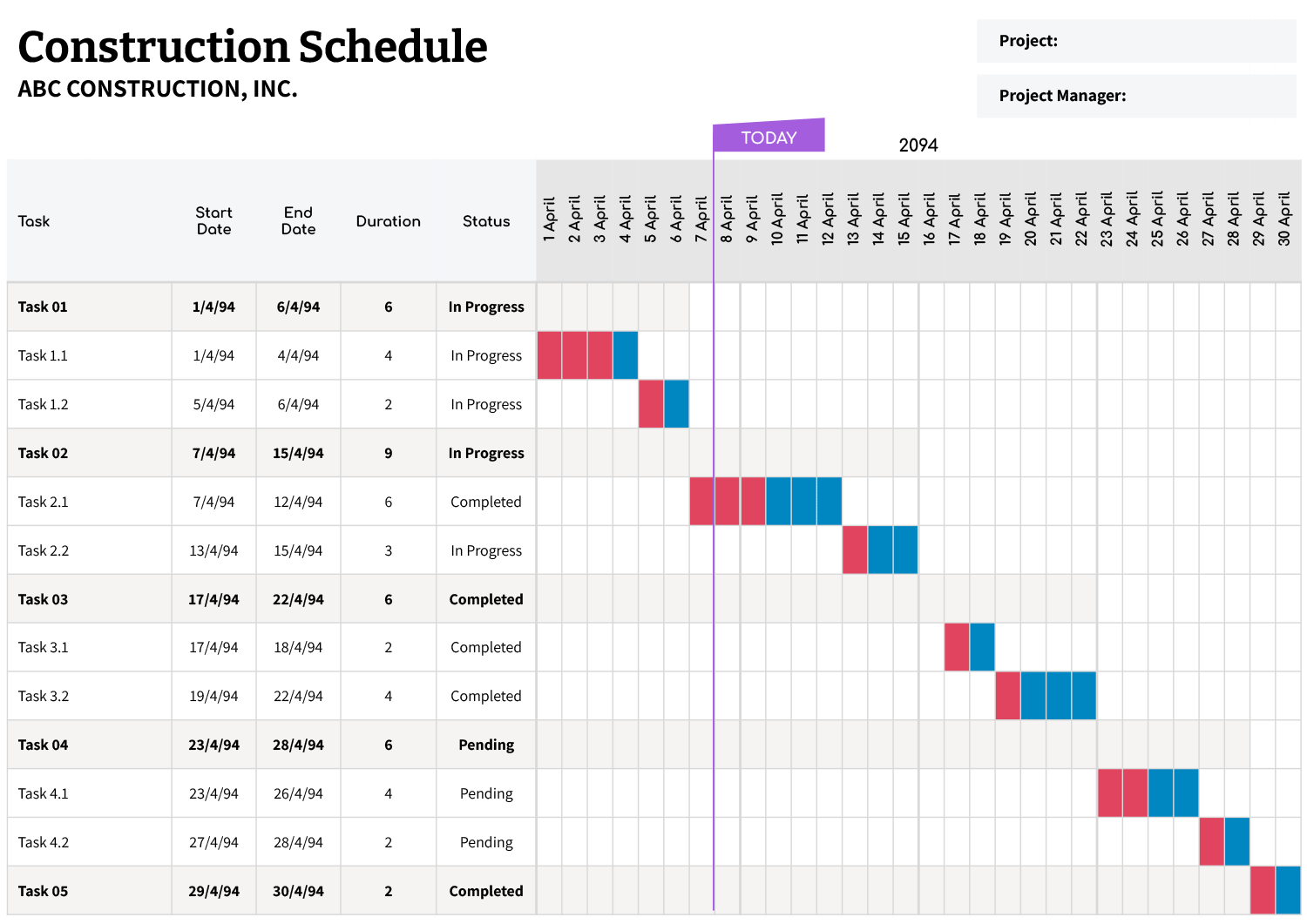



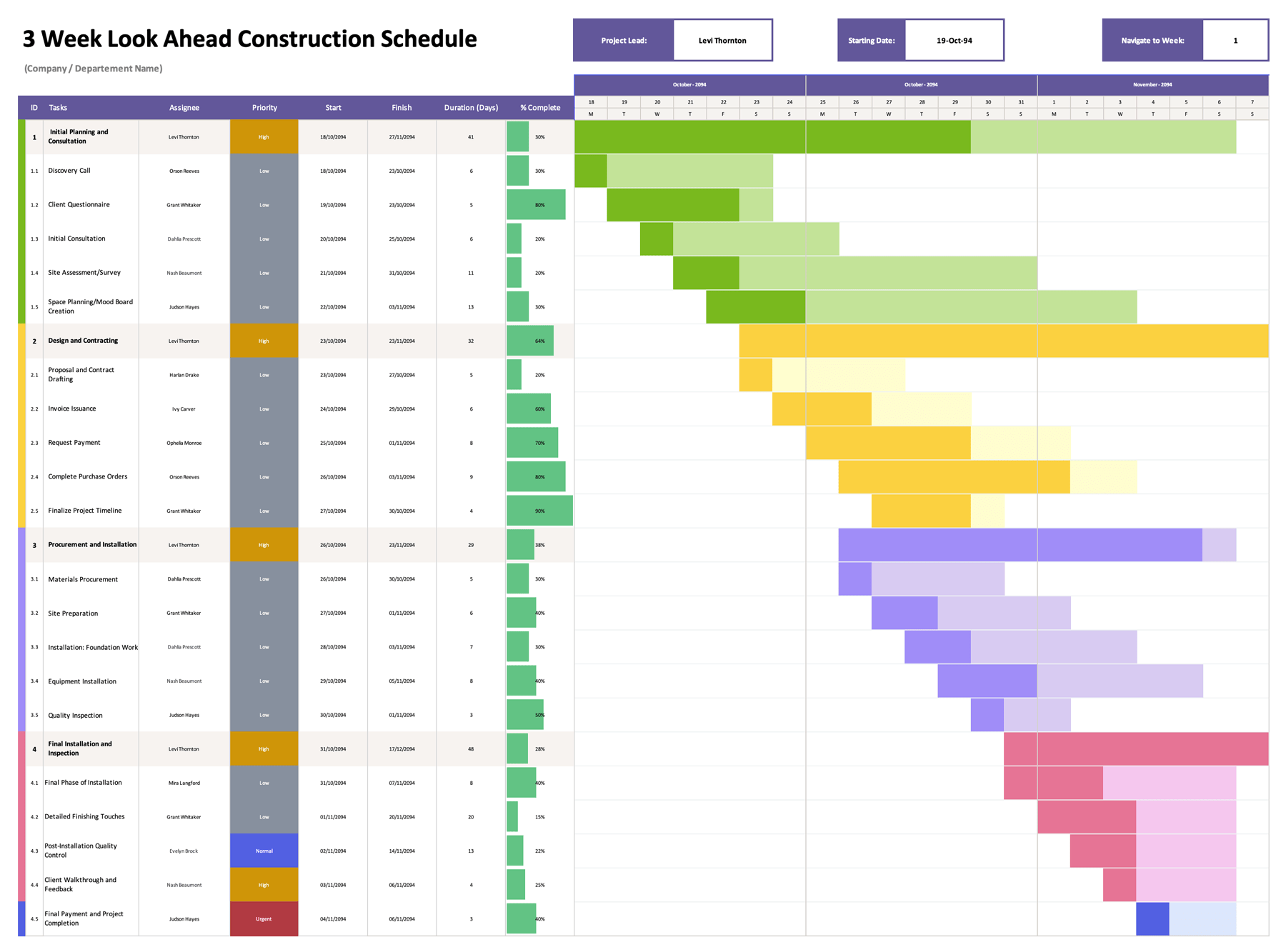


These construction schedule templates map a build as an ordered sequence against dates, so each phase, the trade on it, and what it depends on are explicit and the next crew knows when the site is ready for them. Because each phase gates the one after it, the schedule is also where a slip shows its knock-on effect, on the sheet, before it reaches the site.
Builds are planned at more than one horizon, so the collection runs from a two-week look-ahead that keeps a crew on the work immediately in front of them to a full Gantt timeline spanning groundwork to handover. Several of the spreadsheet versions tie the timeline to a start date and a week-navigation control, with the week columns worked out from that date, so shifting the program forward redraws the bars instead of having you re-enter them. You enter the phases in order, give each a start and finish, set which depends on which, and the schedule shows where one delay would push the rest.
The chain that counts: On a build, the schedule's real job is protecting the critical path, the chain of phases where any delay delays the finish. Tracking which tasks fall on that path, rather than treating every task as equally urgent, is what tells you where a slip actually costs you time.
Parts of a construction schedule
The parts that turn a build into a sequence you can track.
The work broken into phases and tasks down one side, groundwork to handover, so the whole job reads as an ordered sequence rather than a pile of jobs.
A planned start and end for each task, the figures the timeline is drawn from and the basis for spotting where a slip pushes the next trade.
Horizontal bars that set each task across the days it spans, so overlaps and the order of trades read at a glance across the program.
A mark of the crew or subcontractor on each task and how critical it is, so responsibility and urgency sit alongside the dates.
On the spreadsheet designs, a setting that moves the timeline to a chosen week, so a long build can be read a stretch at a time.
The links that make a phase start only after the one it relies on, which is what exposes where a single delay would push the rest.
Sequencing the build
From a task list to a dated timeline the trades can work to.
A two-week look-ahead suits near-term crew focus; a full Gantt timeline suits the whole build. A short job reads better on the look-ahead; a long program needs the full span.
On the spreadsheet designs, set the program's start date and the lead and company in the header. The timeline columns build from that date, so the calendar matches the real schedule.
Tip — Because the dates drive the chart, changing a task's start or finish moves its bar with it, so you adjust the program by editing dates rather than redrawing the timeline.
Enter the tasks in the sequence they happen, groundwork before framing before fit-out, and mark which trade owns each. The order on the sheet is the order on site.
Give each task a start and finish, and make a phase that depends on another start after it ends. This is the step that exposes where one delay would push the rest, and where the schedule earns its keep.
Several of these templates are spreadsheets and several are documents, and the difference is worth matching to the job. The spreadsheet Gantt and look-ahead versions tie the timeline to a start date, so the bars and week columns redraw when dates change, which suits a live program that shifts as work proceeds. The document versions give a clean, fixed presentation for a schedule being printed, posted, or handed over rather than constantly updated.
FAQs
What is a two-week look-ahead for?
It narrows the schedule to the work coming up in the next fortnight, so the crew plans around what is immediately in front of them. It works alongside a full program rather than replacing it, the look-ahead for daily focus, the Gantt for the whole build.
Do the Gantt bars update if dates change?
On the spreadsheet versions, yes. The timeline is tied to each task’s start and finish and to the project start date, so changing a date moves the bar and the week columns with it, rather than needing the chart redrawn by hand.
How do I keep one delay from derailing the build?
Set the dependencies so each phase starts after the one it relies on, then watch the tasks on the critical path, the chain where any slip moves the finish date. Seeing that chain is what tells you which delay matters and which has slack to absorb it.