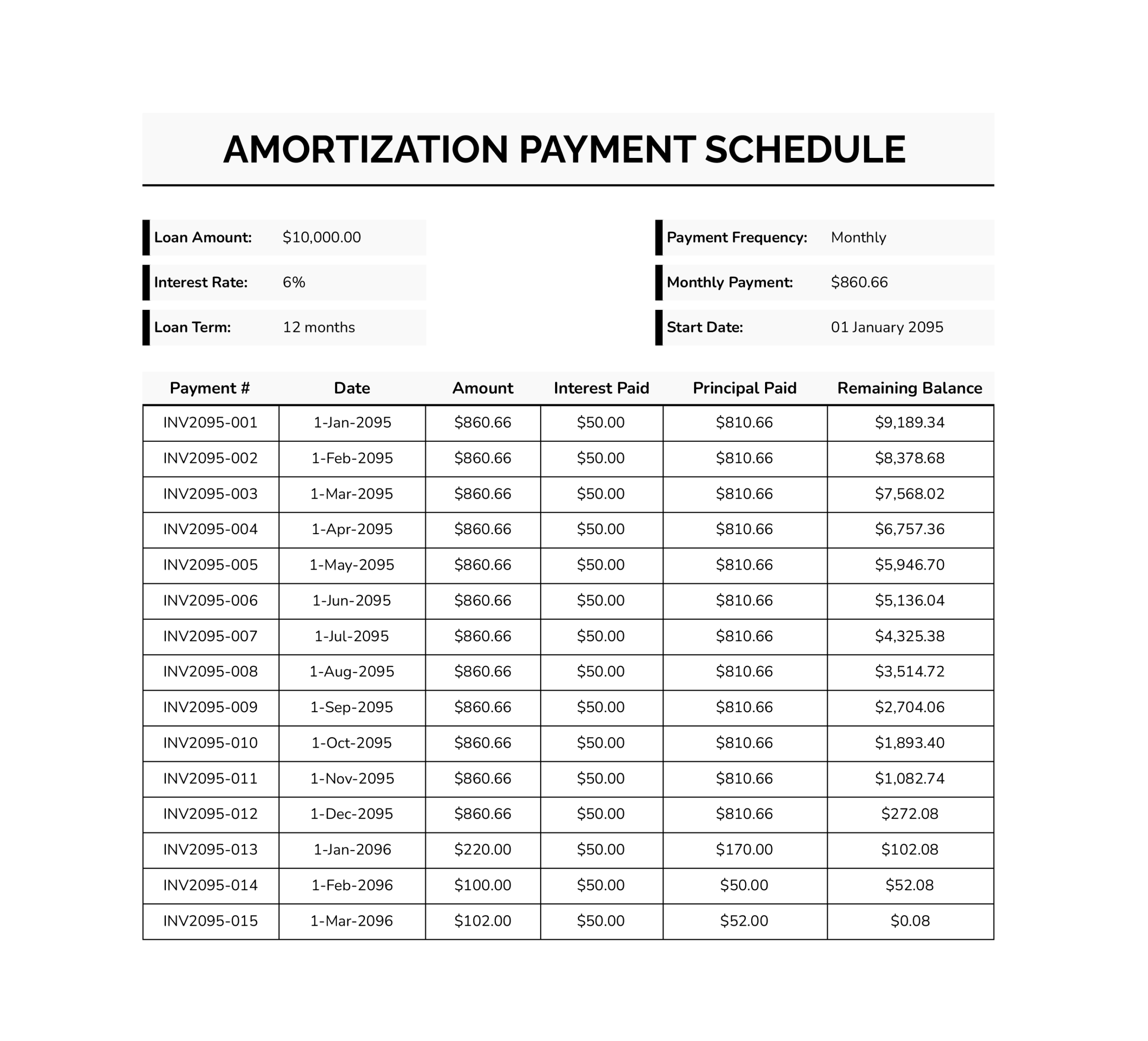



Loan repayment is easier to manage when each payment is split into interest and principal and the remaining balance updates after every entry. This template records that progression in a consistent way. After the loan terms are entered, each payment line calculates the interest for that period, applies the rest to principal, and carries the updated balance forward to the next line.
This amortization payment schedule template is designed for personal loans and business financing, including equipment purchases and owner-financed agreements. It can be used to map the repayment timeline before the first payment. It also works for recording payments as they occur and comparing the results against lender statements. If payment amounts or timing change during the term, update the affected rows and continue from the revised balance.
How to Use This Amortization Payment Schedule
Before entering payments, confirm the terms match the loan agreement, especially the interest rate type and payment timing. This template is most useful when each row reflects the real payment date and the portion applied to the loan balance, so the remaining balance stays aligned with statements.
Start With the Loan Details at the Top
Complete the header fields first. Enter “Loan Amount” as the opening principal. Enter “Interest Rate” as the annual rate listed in the agreement. Fill in “Loan Term” using the same unit shown in the loan terms, such as months. Set “Start Date” based on how the schedule will be tracked, often the first payment date for a payment log or the loan start date for planning.
For “Payment Frequency,” keep it consistent with the agreement so the timing stays aligned across the schedule.
Set the Payment Amount Used for the Schedule
If the loan uses a fixed payment, record it in “Monthly Payment” and use that value as the standard entry for the “Amount” column. If payments vary, enter the actual amount in each row. This keeps the interest and principal split tied to what was paid.
If payments include escrow, insurance, penalties, or processing fees, decide what “Amount” represents before entering rows. For amortization tracking, “Amount” should reflect the portion applied to the loan balance. If total cash outlay also needs tracking, add a separate column for fees.
Record Payments Row by Row in the Table
Each row represents one payment event. Use “Payment #” as a reference that matches internal records, such as a sequence number, receipt number, or transaction reference. Enter the “Date” as the due date when forecasting or the paid date when documenting history.
Enter the payment “Amount,” then review the calculated columns. “Interest Paid” shows the interest for the period. “Principal Paid” shows the portion applied to principal. “Remaining Balance” shows the updated balance after that payment.
Extra payments are easier to verify later when recorded as separate rows with their own date and reference, rather than being merged into a regular payment line.
Handle the Final Payment and Rounding
Final payments often differ slightly because of rounding to cents and how interest applies in the last period. If the last “Remaining Balance” is a small number instead of zero, adjust the final “Amount” so the balance closes out cleanly.
If a lender payoff quote is available, align the final payment row to that figure since it reflects interest through a specific payoff date.
Extend the Schedule for Longer Terms
If more rows are needed, extend the table by copying the formula pattern downward. Continue the date pattern and enter payment amounts as needed. The key is keeping each new row linked to the prior row’s balance so the running balance stays accurate.
FAQs
Small differences are common when the lender uses daily interest, a specific day-count method (365 or 360), or a different rule for when interest starts and stops around the payment date. Rounding can also shift totals over time if interest is rounded per period on the statement but carried with more precision in calculations. If the gap is more than a minor rounding difference, review payment dates, interest method, and whether any fees or escrow amounts were included in the payment figure.
Record the extra amount as its own payment line with its own date and reference. This keeps the balance trail readable and makes it easier to confirm why the payoff date changed. If the lender applies the extra amount to principal after covering interest, the principal portion on that row should reflect the remaining amount after interest for that period.
Yes, but the interest calculation needs to reference the rate that applies to each period. A common approach is adding a “Rate” column and updating it on the row where the change begins, then calculating period interest using that row’s rate. If the lender changes the rate mid-cycle, align the change to how the lender applies it, which may require splitting that month into two rows.
Add a final row for the balloon amount on its due date. The payment amount on that row should match the balloon figure or the payoff quote, depending on how it is being documented. The interest for that period should still be calculated using the balance carried from the previous row.